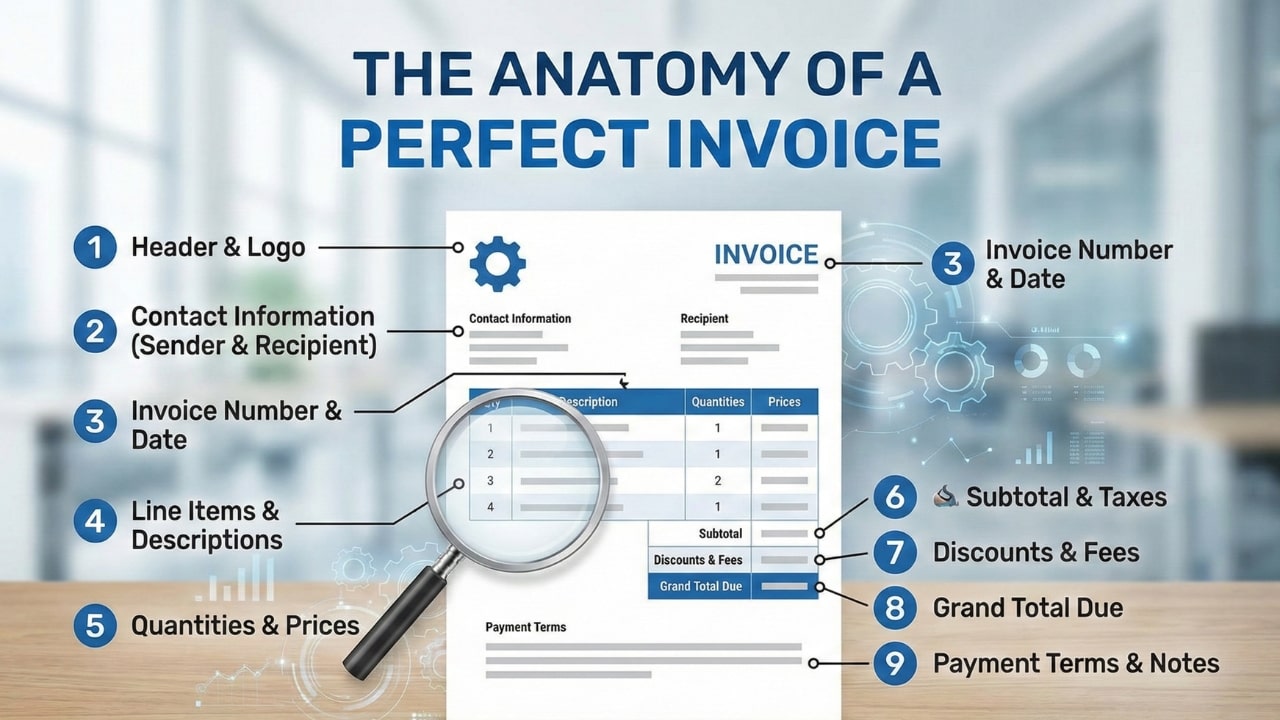
An invoice is more than just a piece of paper asking for money. It is a legal document, a branding tool, and the final handshake of a project.
If you get it right, you get paid quickly and look like a total pro. If you get it wrong—by missing a single number or date—your payment can get stuck in corporate limbo for weeks.
Whether you are a freelancer sending your first bill or a small business owner looking to streamline your process, this guide covers everything. We are going to dissect the Anatomy of a Perfect Invoice, element by element.
1. The "Header": Professional Identity
Your invoice should scream "I am a professional" before the client even reads a single line item. The header sets the tone for the entire transaction.
Why it matters: The word "INVOICE" needs to be the biggest thing on the page. Not "Bill," not "Statement," and definitely not just "For Services." Large companies use OCR (Optical Character Recognition) software to scan documents. If the software can't find the word "INVOICE," it might categorize your bill as spam or general correspondence.
2. The "Who": Seller & Buyer Details
Legally, an invoice must show exactly who is charging whom. This sounds simple, but it is the #1 reason for rejection.
New York, NY 10001
john@example.com
456 Corporate Blvd
San Francisco, CA 94105
💡 The "Gatekeeper" Trick:
Always add an "Attn:" line. Don't just send it to the company address. Send it to "Attn: Accounts Payable" or the specific person who manages the budget. This ensures your invoice lands on the right desk immediately.
3. The "Metadata": Tracking Numbers & Dates
This is the boring stuff that saves your life during tax season. Every invoice needs a unique fingerprint.
- Invoice Number: Must be unique. Never name a file just "Invoice.pdf". Use a sequence like INV-1001, then INV-1002. If a client sees "INV-001," they know you are new. Start at 1001 to look established.
- Date of Issue: The day you hit send. This starts the legal clock on the payment terms.
- Due Date: Be specific. "Due in 30 days" requires the client to do math. "Due October 24th, 2025" creates a clear deadline in their calendar.
4. The "Meat": Line Items (The 'What Am I Paying For?' Test)
Vague invoices get delayed. Detailed invoices get paid. The person approving the invoice might not be the person you worked with, so the description needs to explain the value instantly.
| Description | Qty | Price | Total |
|---|---|---|---|
| Web Design - Phase 1 Homepage layout, mobile responsiveness setup, and initial SEO configuration. | 1 | $1,500.00 | $1,500.00 |
| Logo Design 3 iterations + final vector files. | 1 | $500.00 | $500.00 |
Bad: "Consulting Services"
Good: "Strategic Consulting: Q4 Marketing Plan Audit & Social Media Strategy
Guide"
5. The "Math": Subtotals, Taxes & Discounts
Never make the client do math. If they have to pull out a calculator to figure out how much to write the check for, you have failed.
Your invoice structure should flow logically:
- Subtotal: The cost of work before extras.
- Tax/VAT: If you are legally required to collect tax, list the percentage clearly (e.g., VAT 20%).
- Discount: If you gave them a deal, show it here! Don't just lower the price secretly. Show "-$200 Loyalty Discount" so they value your generosity.
- Grand Total: The final number. Make this bold, large, and impossible to miss.
6. The "How": Payment Methods (The 2-Click Rule)
You'd be surprised how many people forget this. You tell them they owe $2,000, but you don't tell them how to send it.
The 2-Click Rule: It should take the client no more than 2 clicks (or glances) to figure out how to pay you.
PAYMENT DETAILS:
Bank Transfer (Preferred)
Bank: Chase | Routing: 123456789 | Acct: 987654321
Or pay via Credit Card: stripe.com/pay/yourname
7. The "Terms": Boundaries & Late Fees
This section protects you. It is the "fine print," but it shouldn't be hidden.
Payment Terms: Reiterate when the money is due (e.g., "Net 15" or "Due on
Receipt").
Late Fees: Add a standard clause like: "A late fee of 5% per month will be
applied to balances unpaid after 30 days." You don't have to enforce it, but having it
there encourages prompt payment.
8. The "Footer": The Politeness Premium
Invoices are transactional, but business is relational. The footer is where you stop being a debt collector and go back to being a partner.
Data from FreshBooks shows that including a simple "Thank you for your business!" increases the percentage of invoices paid on time by over 5%. It’s a small human touch that reminds the client they are paying a person, not a robot.
9. The "X-Factor": Design & Branding
Finally, let's talk about looks. Does your invoice look like a crumpled receipt from a gas station? Or does it look like a document from a premium agency?
Branding isn't just vanity; it's psychology. A clean, branded invoice with your logo and colors signals stability. It tells the client, "I take my business seriously, so you should take paying me seriously."
Summary: Automate Perfection
You could build this layout in Excel, align the cells manually, calculate the taxes yourself, and export it to PDF. But you risk breaking the formatting every time you add a line item. You risk math errors. You risk looking like an amateur.
NextZoto automates all 9 of these elements. You simply fill in the blanks, and our engine generates a perfectly structured, legally compliant, and beautiful PDF invoice for you in seconds.
Build Your Perfect Invoice Now
No sign-up required. 100% Free. Professional PDF download.
Start Invoicing